
Most service websites have a linking problem nobody talks about. The homepage links to the blog. The blog links to other blog posts. Service pages link to nothing. Nobody planned it that way, it just grew like that over months and years of publishing without a system.
The result is predictable. Google cannot figure out which pages matter most. Link equity, the authority that passes between pages through links, pools in the wrong places. Service pages that should rank sit ignored while a blog post from two years ago gets all the attention.
I have seen this pattern in nearly every service website audit we run. It is not a content problem or a technical problem. It is a structural problem. And the fix is not complicated once you understand what you are actually building.
Before going further: if your service pages are not even getting indexed yet, that is a different problem with its own diagnosis. We cover it in detail in our guide on why service pages are not indexed. Start there first, then come back here for the linking layer.
For the full picture on service website SEO, our SEO strategy guide for service websites covers architecture, intent mapping, and content structure in one place.
Why Internal Linking Matters More on Service Websites Than on Blogs
Blog sites earn links naturally. Other writers reference them, readers share them, media outlets cite them. Authority builds without much deliberate effort.
Service websites do not work that way. The pages that need authority most, the service pages, are the last pages anyone links to from outside your site. Nobody writes a think piece linking to your “Local SEO Services” page.
Internal linking is how you compensate for that gap. You move authority from pages that do earn links, your blog posts and homepage, to the pages that actually need it. Google also reads internal links as a map of your site. Which pages link to which tells it what the hierarchy is and which pages deserve crawl priority.
On a service website, you are the one who builds that map. Nobody else will do it for you.
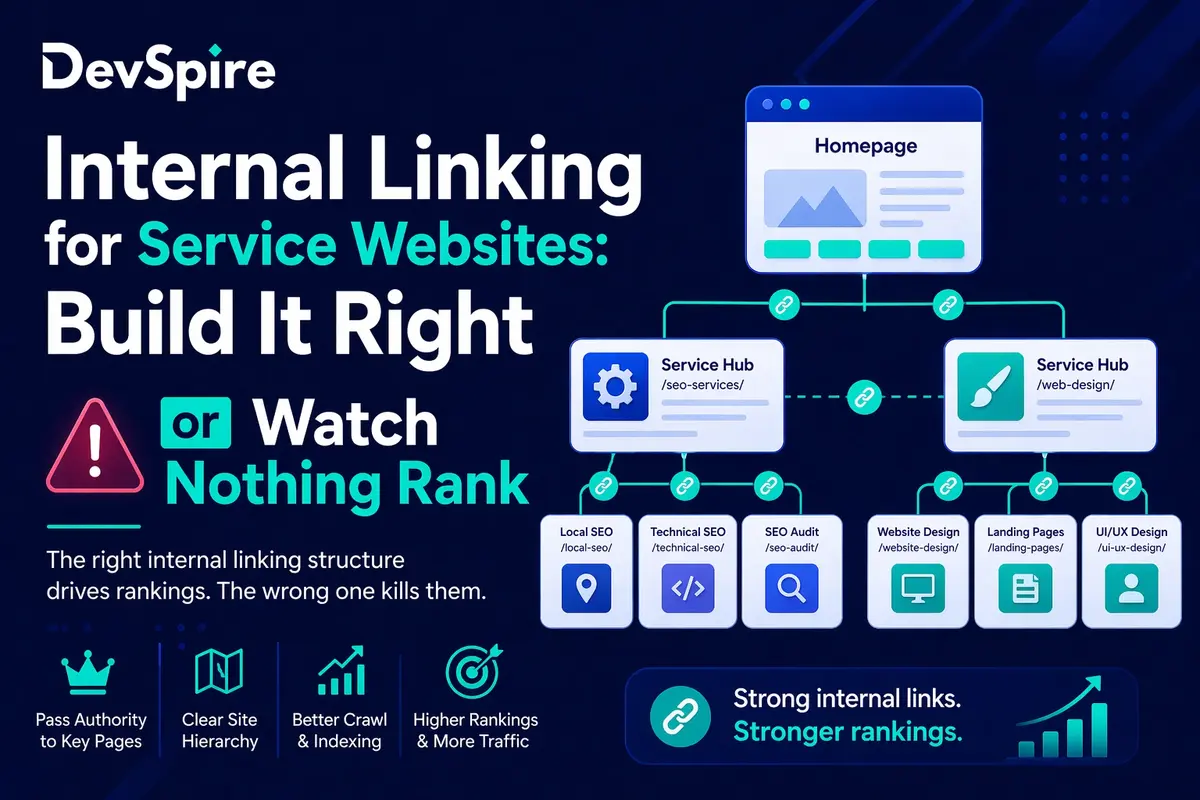
The 3-Tier Linking Model That Works for Service Websites
The cleanest internal linking structure for a service website follows three tiers.
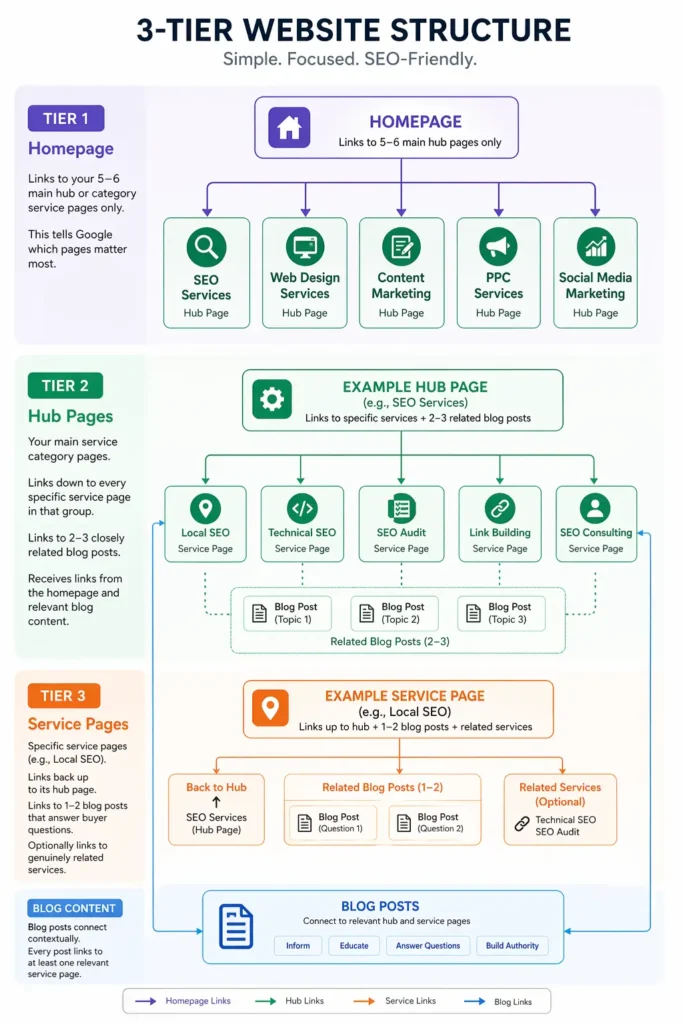
Blog posts sit outside this hierarchy but connect to it at every level. Every post should link to at least one service page it supports. That is where most of the wasted authority lives on service websites, and it is the easiest thing to fix.
In audits we run, this three-tier model is what we check against first. Sites that follow it consistently have fewer indexing gaps and cleaner ranking patterns than sites that don’t.
Anchor Text: The Part Most People Get Wrong
A link that says “click here” tells Google nothing about the destination page. A link that says “technical SEO for service businesses” tells Google exactly what that page covers.
Most service websites use generic anchors. “Learn more.” “Read this.” “Our services.” These are wasted opportunities, every single one.
Descriptive and partial match anchors work better and feel more natural: “our WordPress SEO process” instead of “SEO services,” or “how we approach local SEO for contractors” instead of “click here.” You are not stuffing keywords, you are just being specific about what the link leads to.
One thing worth knowing: contextual links, links embedded inside a paragraph of related content, carry more weight than links sitting alone in a sidebar or a footer. A link inside a sentence that is already about local SEO, pointing to your local SEO page, sends a much cleaner relevance signal than the same link floating in a “related links” block.
In our experience, changing generic anchor text to descriptive anchors on key internal links moves rankings within four to six weeks, without any other changes to the page.
Blog Posts Are Your Biggest Untapped Linking Asset
Blog posts earn external links. Other sites reference them, social shares happen, forums cite them. That authority lands on the blog post URL and mostly stays there.
On service websites, that is a problem. The authority accumulates on blog content while service pages, the ones you actually need to rank, get nothing.
The fix is straightforward. Every blog post should include at least one contextual internal link to the service page it supports. A post about fixing crawl errors in WordPress links to your WordPress SEO service page. A post explaining what crawl budget means links to your technical SEO page. A post about Google Business Profile optimization links to your local SEO service.
These links are not forced. If the post genuinely supports a service, the link belongs there. The anchor text should describe the service, not the action. “Our WordPress SEO service” works. “Click here to learn more” does not.
This is the most underused internal linking opportunity on almost every service website we audit.
Hub Pages and How They Distribute Authority
A hub page groups related services together at the category level. It links down to specific service pages and receives links from the homepage and blog posts.
Hub pages matter because they concentrate authority before distributing it. Without a hub page, a specific service page has to earn all its authority independently. With a hub page in the chain, it inherits authority through the linking structure above it.
Related service linking works the same way. When two services are genuinely connected, a link between them is natural and useful. A web design page linking to a conversion rate optimization page makes sense. A web design page linking to a social media management page is a stretch. Only add these links where the connection is real. Forced links dilute the signal.
Finding and Fixing Orphan Pages
An orphan page exists on your site but has no internal links pointing to it. Google can discover it through the sitemap, but without links it treats the page as low priority and often skips it during regular crawls.
On service websites, orphan pages are almost always new service pages that got published without being added to navigation or linked from any existing content.
How to find them: Screaming Frog has an orphan page report in its site audit section. Ahrefs Site Audit flags them under “Issues.” Google Search Console Coverage report shows pages that are discovered but crawled infrequently.
The fix: add the page to its hub page as a linked service. Find one related blog post and add a contextual link. If it is a primary service, add it to the main navigation.
The crawl and indexing side of orphan pages is covered in more detail in our article on why service pages are not indexed. This section is only about the linking fix.
A Quick Internal Linking Audit in 5 Steps
You do not need a big tool budget for this. Here is what to check first.
- Run Screaming Frog on your site. Export the In-links report. Filter for any service page with fewer than 3 internal links pointing to it. That page is underserved.
- Export your full blog post list. Check how many posts have zero links to any service page. Those posts are sitting on authority they are not passing anywhere.
- Open Google Search Console. Go to the Links report. Look at your most internally linked pages. If blog posts dominate and service pages are near the bottom, your structure is inverted.
- Review anchor text on your 10 most important internal links. If most say “read more” or “learn more,” rewrite them with descriptive text.
- Count how many pages your homepage links to directly. If it exceeds eight, you are spreading the authority signal too thin. Cut it to five or six core hubs.
Internal linking is the one SEO lever that is entirely in your control. No waiting for backlinks, no algorithm updates to worry about. You decide where the authority flows. On a service website with 10, 20, or 50 pages, getting this right is the difference between service pages that rank and service pages that sit in the index doing nothing.
Start with the audit steps above. Fix the orphan pages first. Then work through the anchor text. The results show up faster than most people expect.